Quote vs Estimate vs Invoice: What Is the Difference?
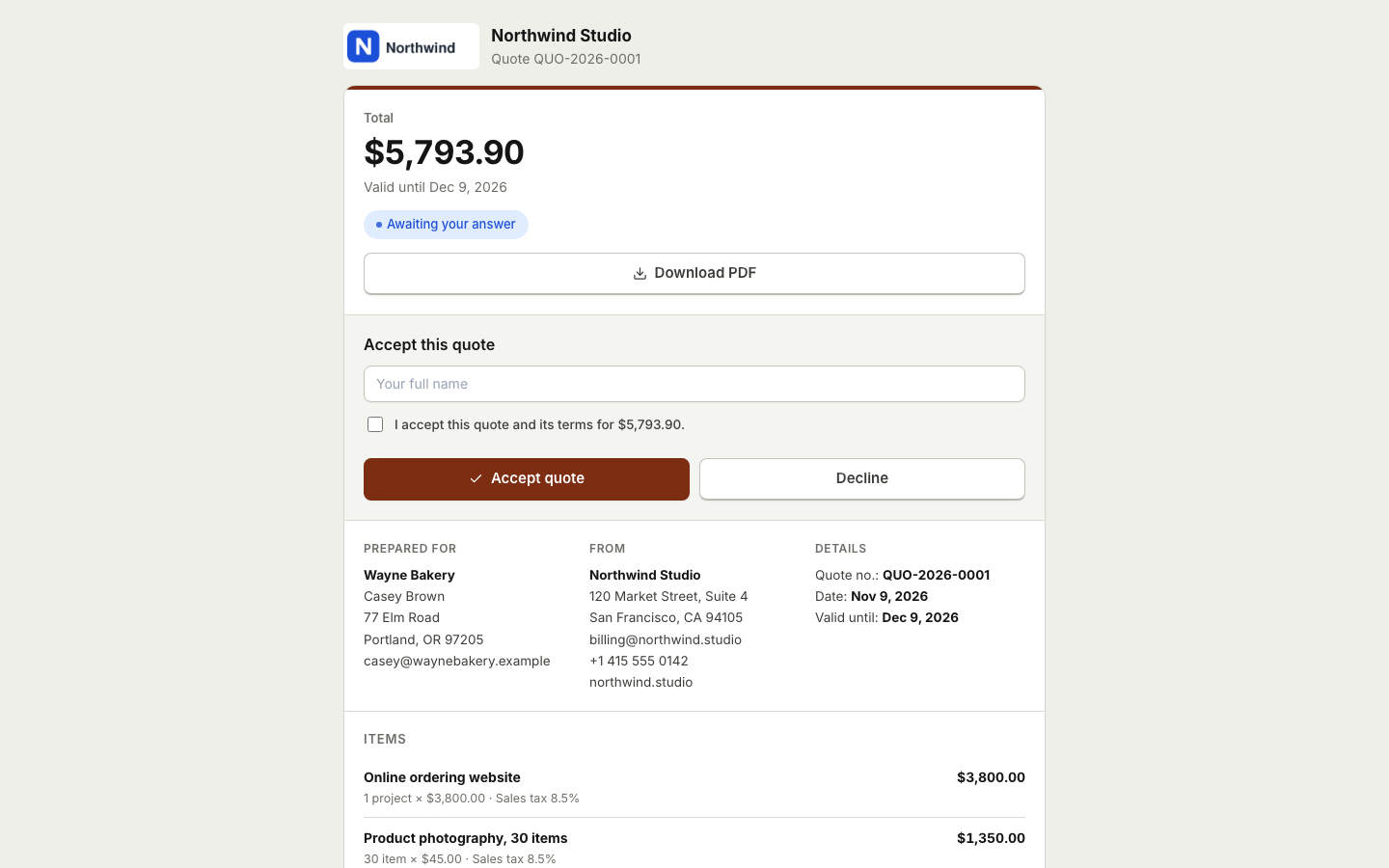
Quotes, estimates and invoices often use the same layout, the same line items and the same logo. That makes it easy to mix them up. But each one does a different job, and using the right one sets clear expectations with your client. This guide explains the difference, when to use each, and how to move from one to the next without retyping. Terms and rules vary by country and industry, so this is general guidance, not legal advice.
The short version
| Document | What it says | When you send it | Price |
|---|---|---|---|
| --- | --- | --- | --- |
| Estimate | "This is roughly what it will cost" | Before the work, when the scope is uncertain | Approximate |
| Quote | "This is what it will cost" | Before the work, when the scope is clear | Fixed for a set period |
| Invoice | "This is what you owe" | After the work, or on agreed dates | Final |
What is an estimate?
An estimate is an educated guess. You send it when you cannot know the exact cost until you start, for example a repair where you have not seen the damage yet, or a project where the client is still deciding on details.
A good estimate:
- Describes the work and your assumptions.
- Gives a price or a price range.
- Says clearly that the final cost may change, and what could change it.
- Has a date and an expiry date.
The key is honesty. If the cost is going to move, tell the client as early as you can.
What is a quote?
A quote is a firm offer. You send it when you know the scope and can commit to a price. If the client accepts it, you are both agreeing to that work at that price, usually for a limited time.
A good quote:
- Lists each item with quantity, unit price and taxes.
- States what is included and what is not.
- Shows a total and the currency.
- Says how long the price is valid.
- Explains how the client can accept.
Many people use "quote" and "estimate" for the same thing. That is fine, as long as the document itself is clear about whether the price is fixed.
What is an invoice?
An invoice is a request for payment. It comes after the work is done, or on dates you agreed in advance, such as a deposit or a monthly retainer. It needs a unique invoice number, an invoice date, a due date, the amount due and how to pay. In many countries it is also the document your client uses for their tax records, so the details matter. See how to write an invoice that gets paid on time for a full checklist.
When to use each
- Use an estimate when the job could grow or shrink: repairs, renovations, open ended consulting.
- Use a quote when the scope is set: a photography package, a website build with an agreed list of pages, a regular cleaning service.
- Use an invoice when it is time to be paid: on delivery, at a milestone, or on a schedule.
Some businesses send both: an estimate first to set a budget, then a quote once the details are agreed.
From quote to invoice in BooksBat
Retyping a quote into an invoice wastes time and invites mistakes. In BooksBat quotes and estimates use the same line items, taxes, discounts and currency as invoices, so the move is instant.
- Create a quote for a saved client, adding items from your products and services catalog.
- Send it. Your client gets an email with the PDF and a link to a mobile friendly page.
- Your client accepts with a typed name and a checkbox, optionally with an e signature, or declines with a reason so you know what to change.
- Turn the accepted quote into an invoice with one click, or let BooksBat do it automatically when the client accepts.
- Send the invoice. If you have connected a payment provider such as Stripe or PayPal, your client can pay online straight away, and the sale and payment are recorded in your books. See online payments.
Every step is recorded on the timeline, so you can see when the quote was sent, viewed and accepted.
Tips for quotes that get accepted
- Send it quickly. A quote that arrives the same day shows you are organized.
- Be specific. Line items the client recognizes are easier to approve than one big number.
- Set an expiry date. It protects you from price changes and gives the client a reason to decide.
- Make accepting easy. A button on a web page beats printing, signing and scanning.
- Follow up. A short note a few days later is often all it takes.
Common mistakes to avoid
- Calling a firm price an estimate. If you will not change the price, call it a quote, so the client knows exactly what to expect.
- Calling a guess a quote. If the cost could move, say so plainly, or you may end up absorbing the difference.
- No expiry date. A quote that never expires can be accepted months later, after your costs have gone up.
- Vague line items. "Website work" invites questions. "Five page website, design and build, two rounds of changes" does not.
- Forgetting taxes. Show whether prices include or exclude tax, and list each tax rate on its own line.
- Retyping the quote into the invoice. Copying by hand is where numbers go wrong. Convert the accepted quote instead, so the invoice matches what the client agreed to.
- Not following up. A quote with no answer after a week deserves a short, friendly check in.
Picking a design
Your quotes and invoices should look like they come from the same business. BooksBat offers 8 invoice designs that use your logo and brand color for both, with PDF and Word (.docx) downloads. The template library has examples by industry, such as a construction estimate, a catering quote and a photography package.
Ready to try it? Sign up free and send your first quote. The free plan includes 5 quotes and 5 invoices a month, along with bookkeeping, expenses and core reports.
Frequently asked questions
Is a quote legally binding?
It depends on where you work and what the quote says. In many places an accepted quote can form part of an agreement. If it matters, ask a local professional and state your terms clearly on the quote.
Can the final price differ from an estimate?
Yes, that is the point of an estimate: it is your best guess. Tell the client early if costs will change, and explain why.
How long should a quote be valid?
Many businesses use 14 or 30 days. Pick a period that protects you from price changes and write the expiry date on the quote.
Do I need to send a new document after a quote is accepted?
Yes, you send an invoice to request payment. In BooksBat an accepted quote becomes an invoice with one click, or automatically, so you do not retype anything.
Can a client accept a quote online?
Yes. In BooksBat your client opens the quote from the email and accepts with a typed name and a checkbox, optionally with an e signature, or declines with a reason.