How to Write an Invoice That Gets Paid on Time
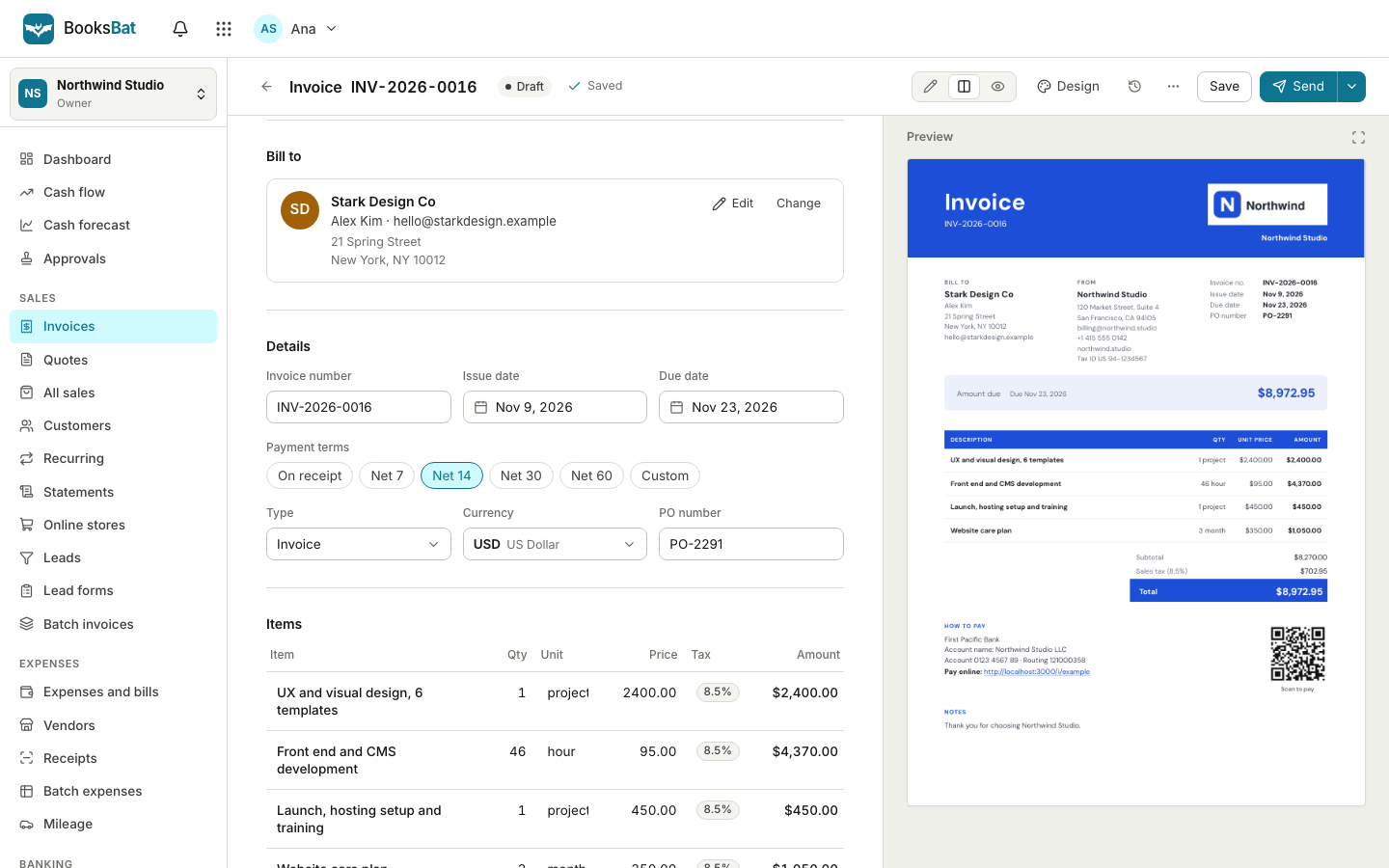
Late payments are rarely about bad clients. Most of the time the invoice was unclear, arrived late, went to the wrong person or made paying harder than it needed to be. This guide covers what to put on an invoice, how to word your terms, and a few simple habits that help you get paid on time. Rules for what an invoice must contain vary by country, so treat this as practical guidance, not legal or tax advice.
What to put on every invoice
A good invoice answers every question your client's accounts team might have, so they can approve it without writing back to you.
- Your business details: name, address, email and, where it applies, your tax or VAT id.
- Your client's details: the company name, the contact person and their billing address. Ask who approves invoices before you send the first one.
- A unique invoice number: numbers should never repeat. A format like
INV-2026-0001is easy to read and sort. - Invoice date and due date: write the actual due date, not only "Net 30". A date is harder to miss.
- A clear description of the work: one line per product or service, with quantity, unit, unit price and line total.
- Taxes and discounts: show each tax rate and amount separately, plus any discount or shipping.
- The total due and the currency: make the amount impossible to miss.
- How to pay: a payment link, your bank details, or both.
- A short note: a thank you and, if relevant, a purchase order number or project reference.
Set payment terms before you start
The best time to talk about payment is before any work begins. Agree on how much, when you will invoice, and how many days the client has to pay. Put it in your quote or contract, and repeat it on the invoice.
Common terms include:
| Term | What it means | When it suits |
|---|---|---|
| --- | --- | --- |
| Due on receipt | Pay as soon as the invoice arrives | Small jobs and one off clients |
| 7 or 14 days | Pay within a week or two | Freelancers and small businesses |
| 30 days | Pay within a month | Larger companies with set payment runs |
| Deposit plus balance | Part up front, the rest on delivery | Projects and bigger jobs |
Shorter terms often lead to faster payment, but use what your client can actually work with. A client with a monthly payment run will not pay a 7 day invoice any sooner.
Send the invoice promptly
Send the invoice the day the work is done, or on the agreed date for ongoing work. Every day you wait pushes the due date further away. If you invoice monthly, pick a day and stick to it, so your client expects it.
Send it to the right person. If a company has an accounts payable email address, use it, and copy your day to day contact so they know it has gone out.
Make paying the easy option
The fewer steps between reading the invoice and paying it, the better. A payment link removes the need to copy bank details by hand.
In BooksBat you can connect your own payment provider account in Settings > Payments: Stripe on any plan, or PayPal, Square, Razorpay, Mollie, GoCardless or Lemon Squeezy on Pro. Your client then gets an email with the PDF attached and a link to a mobile friendly invoice page where they can view the invoice, download the PDF and pay online on the provider's checkout. The money goes straight to your own account. The provider's normal processing fees apply, BooksBat adds no extra fee by default, and the payment and fee are recorded in your books for you. If you would rather not take online payments, the invoice shows your bank transfer details instead. Read more about online payments.
Follow up without awkwardness
Even good clients forget. A polite reminder is not rude, it is part of the process. A simple schedule works well:
- A friendly heads up a few days before the due date.
- A short note on the due date.
- A firmer reminder about a week after the due date.
BooksBat payment reminders can send these for you, for example 3 days before, on the day and 7 days after. You set them for your whole business or for a single invoice, and they stop as soon as the invoice is paid, so nobody gets chased after paying.
Know where each invoice stands
You cannot chase what you cannot see. Track every invoice through its status: draft, sent, viewed, partially paid, paid, overdue or void. Knowing an invoice was viewed tells you the client has it, which changes the tone of a follow up.
BooksBat shows a timeline of events for each invoice, and the dashboard shows what is outstanding, what is overdue and what was paid this month. The aging report in reports groups unpaid invoices by how late they are, so you know who to call first.
How to write an invoice in BooksBat
- Sign up free and fill in your business profile: logo, address, tax id, default currency, payment terms, tax rates and your invoice number format.
- Add your client, or pick one you saved before. Keep regular products and services in your catalog so you can add them in one click.
- Create an invoice. Add line items with quantity, unit and unit price, apply per line discounts and taxes, and check the due date.
- Choose one of 8 invoice designs that use your logo and brand color.
- Click send. Your client gets the PDF and a link to pay online. Because BooksBat is small business accounting, the invoice is also recorded in your books, so your profit and loss stays up to date.
Want to try it without an account? The free invoice generator makes a single invoice PDF in your browser. Sign up when you want to save, send and get paid online.
A checklist for every invoice
- The client name and billing address are right.
- The invoice number is new and follows your format.
- The due date is written as a date.
- Each line describes the work in words the client will recognize.
- Taxes are correct for where you and your client are.
- The total and currency are clear.
- There is a way to pay right from the invoice.
- Reminders are switched on.
Small details like these add up. An invoice that is clear, prompt and easy to pay is the one that gets paid first. For more on billing models, read quote vs estimate vs invoice and how to set up recurring invoices for retainer clients.
Frequently asked questions
What must an invoice include?
At a minimum: your business name and contact details, the client's name, a unique invoice number, the invoice date, a due date, a description of the work with quantities and prices, any taxes, and the total due. Some countries require more, such as a tax or VAT id, so check the rules where you work.
What payment terms should I use?
Many small businesses use a fixed number of days, such as 14 or 30 days from the invoice date. Shorter terms often get paid sooner. Whatever you choose, agree it with the client before you start and write the exact due date on the invoice.
When should I send an invoice?
As soon as the work is delivered, or on the agreed date for retainers. The longer you wait, the longer you wait to be paid.
How do I make it easy for clients to pay?
Offer a way to pay right from the invoice. In BooksBat, connect your own Stripe, PayPal, Square or other payment provider account and clients can pay online from the invoice page, or show your bank transfer details if you prefer.
Should I send payment reminders?
Yes. A short, friendly reminder before and after the due date is normal and expected. BooksBat can send them automatically and stops as soon as the invoice is paid.