How to Set Up Recurring Invoices for Retainer Clients
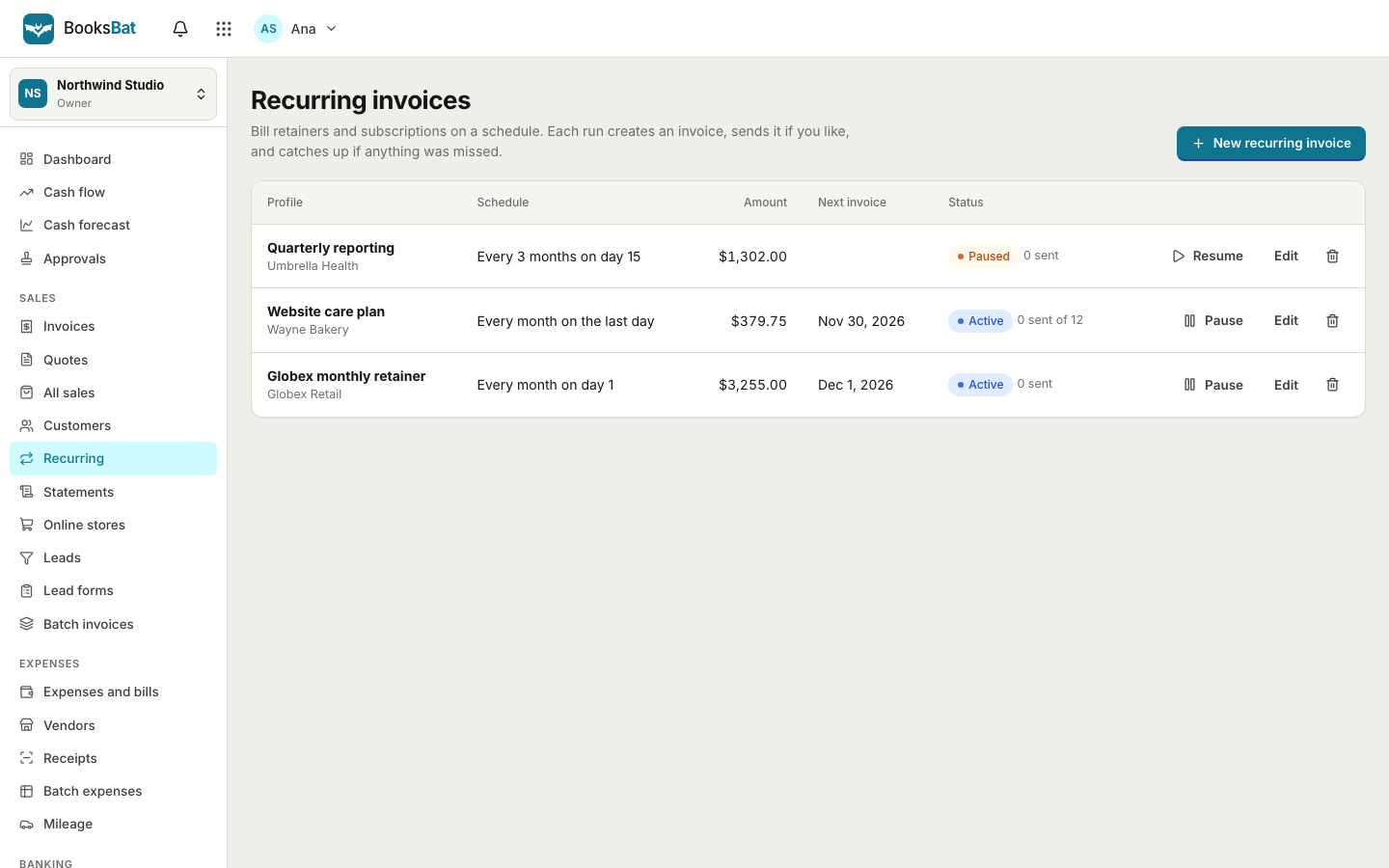
A retainer is one of the best arrangements a freelancer or small agency can have: steady work, predictable income and a client who already trusts you. The billing should be just as steady. Recurring invoices let you set the schedule once and stop rebuilding the same invoice every month. This guide walks through planning a retainer, choosing a schedule and setting it up in BooksBat. Tax and contract rules vary by country, so check what applies to you.
What a retainer usually looks like
Retainers come in a few common shapes:
- Fixed monthly fee for an agreed scope, such as ongoing design, bookkeeping help or website maintenance.
- Prepaid hours each month, with extra hours billed on top.
- Access retainers, where the client pays to have you available, whatever the amount of work.
- Subscriptions for a service delivered on a schedule, such as weekly cleaning or monthly IT support.
Whichever shape you use, write it down: what is included, what costs extra, when you invoice, the payment terms and how either side can end it.
Choose a billing schedule
Pick a schedule that matches how the client pays and how you deliver the work.
| Schedule | Good for |
|---|---|
| --- | --- |
| Weekly | Cleaning, tutoring and other weekly services |
| Every 2 weeks | Contractors paid on a fortnightly cycle |
| Monthly on a day | Most retainers, billed on the 1st or another fixed date |
| Monthly on the last day | Billing for the month just finished |
| Quarterly | Larger clients and advisory retainers |
| Yearly | Annual support plans and licenses |
Many retainers bill in advance, at the start of the period. That keeps you from working a month before you are paid. If you bill for prepaid hours plus extras, billing at the end of the period may be easier.
Decide: send automatically or review first
This is the most important choice.
- Send automatically when the amount is the same every time. The invoice is created and emailed without you lifting a finger.
- Create as drafts when the amount changes, for example when you add extra hours. You get a draft to check, adjust and send.
You can start with drafts for the first few months and switch to automatic once the numbers settle.
Set up a recurring invoice in BooksBat
- Sign up and complete your business profile, including your logo, payment terms, tax rates and invoice number format.
- Add the client in client management, and save the retainer as a product or service in your catalog.
- Open Recurring and create a new recurring invoice for the client with the retainer line items.
- Choose the schedule: weekly, every 2 weeks, monthly on a day or on the last day, quarterly or yearly.
- Set the start date and when it ends: after a number of invoices, on a date, or never.
- Choose to send automatically or create drafts.
- Save. BooksBat creates each invoice on schedule with a fresh number that never repeats.
Read more on the recurring invoices page.
Let clients pay in one click
Retainer invoices should be the easiest invoices your client pays. Connect your own payment provider in Settings > Payments, such as Stripe, PayPal, Square or GoCardless for bank debit, and every invoice email includes a link to a mobile friendly page where the client can pay online. The money goes to your own account, the provider's normal fees apply and BooksBat adds no extra fee by default. If you prefer bank transfer, your bank details are shown on the invoice instead. See online payments.
Add automatic reminders
Even on a retainer, invoices slip through. Turn on payment reminders so a friendly email goes out before the due date, on the day and after it, for example 3 days before, on the day and 7 days after. Reminders stop as soon as the invoice is paid, and you can change them for a single client if needed.
Handling changes
Retainers change over time. Here is how to keep billing in step:
- Price change: agree the new rate with the client, then edit the recurring invoice. Future invoices use the new amount.
- Extra work this month: if you create drafts, add a line to this month's draft. If you send automatically, send a separate invoice for the extra.
- Client takes a break: pause the recurring invoice and resume it later.
- Retainer ends: set an end date or stop the schedule. Past invoices stay in your records.
- Partial payment: record it on the invoice. The status shows partially paid until the rest arrives.
Keep an eye on the numbers
Recurring income is easiest to plan when you can see it. The BooksBat dashboard shows what is outstanding, what is overdue and what you were paid this month, with a revenue chart. Reports show sales by customer and an aging report, and because every retainer invoice posts to your books, your profit and loss shows recurring income as soon as it is billed. On Pro you can export reports as CSV, Excel or PDF for your accountant, or invite them to see your books directly.
Common retainer billing mistakes
- Starting the schedule on the wrong date. Check the start date against the agreement, especially if you bill in advance.
- Forgetting the end date. If a retainer runs for a fixed term, set it to end after that number of invoices so nothing goes out by mistake.
- Sending automatically when the amount varies. Use drafts whenever hours or extras change, and review each one before it goes out.
- Not telling the client what to expect. A short note when the retainer starts, saying when invoices will arrive and how to pay, prevents most questions.
- Letting late payments slide. A retainer client who pays late once will often do it again. Reminders keep it friendly and consistent.
A quick retainer checklist
- The scope, price, schedule and payment terms are written down and agreed.
- The client and the retainer item are saved.
- The schedule and end condition match the agreement.
- You chose automatic sending or drafts on purpose.
- Online payment or bank details are on every invoice.
- Reminders are on.
Set it up once and your retainer billing runs on its own. If you are new to invoicing, start with how to write an invoice that gets paid on time. Recurring invoices are part of BooksBat Pro for $4 a month.
Frequently asked questions
What is a recurring invoice?
An invoice that is created again on a schedule, such as every month, with the same client and line items. It saves you from building the same invoice by hand each time.
Should recurring invoices be sent automatically?
If the amount never changes, sending automatically saves time. If you adjust hours or extras each month, create drafts instead, review them and then send.
Can I bill on the last day of the month?
Yes. In BooksBat a monthly schedule can run on a set day or on the last day of the month, so short months are handled for you.
What happens if a client pauses the retainer?
Pause the recurring invoice and resume it when work starts again. Nothing is created while it is paused.
Do I need Pro for recurring invoices?
Yes. Recurring invoices and automatic reminders are part of BooksBat Pro, which costs $4 a month. The Business plan, at $12 a month, includes them too.