The reports your business and your accountant need
Because BooksBat keeps double entry books, every report comes from the same ledger: profit and loss, balance sheet, statement of cash flows, trial balance, general ledger, aging, sales, expenses and budgets. Switch between cash and accrual, drill into any number and export or schedule the result.
- Core reports on the free plan
- Cash or accrual basis
- CSV, Excel and PDF export

Answers to the questions that matter
Am I making money? Can I afford to hire? Who owes me, and who do I owe? How much cash will I have next month? These are the questions financial reports answer, and they only work if the numbers underneath are right. BooksBat builds every report from your general ledger, which is filled in by the invoices, payments, expenses and bills you record.
That means the profit and loss and the balance sheet always agree with each other and with the trial balance. Click any total to see the transactions behind it. When your accountant asks for something, export it in the format they want, or set it to arrive in their inbox every month.
Why business owners rely on BooksBat reports
The standard statements
Profit and loss, balance sheet and statement of cash flows, laid out the way accountants and lenders expect.
Cash or accrual
Flip any report between cash and accrual basis to see income when it was earned or when it was received.
Drill down
Click a total to see the ledger lines behind it, then open the original invoice, bill or entry.
Compare periods
Pick any date range and compare it with another, month by month or year over year.
Export anywhere
Download reports as CSV, Excel or PDF on Pro and Business, ready to share.
Scheduled reports
Email a report to yourself or your accountant every week or month without lifting a finger.
Get your numbers in 3 steps
- 1
Record as you go
Send invoices, record payments and enter expenses and bills. Your books fill in automatically.
- 2
Run a report
Open reports, choose a report, a date range and cash or accrual basis, then drill into any number.
- 3
Export or schedule
Download the report as CSV, Excel or PDF, or schedule it to be emailed on a regular basis.
Reports included
- Profit and loss
- Income, cost of goods sold, expenses and net profit for any period.
- Balance sheet
- Assets, liabilities and equity on any date.
- Statement of cash flows
- How cash moved through operating, investing and financing activities.
- Trial balance
- Debit and credit balances for every account, to check the books balance.
- General ledger
- Every posting to every account, with links to the source transactions.
- Accounts receivable and payable aging
- Who owes you and who you owe, grouped by how overdue it is.
- Sales reports
- Sales by customer and sales by product or service.
- Expense reports
- Expenses by vendor, so you see where the money goes.
- Budget vs actuals
- Your budget next to real results by account and month, on the Business plan.
- Specialist reports
- Sales tax liability, inventory valuation, project profitability, 1099 summary and the audit log, with the matching features.
Cash or accrual: which should I use?
On a cash basis, income counts when you are paid and expenses count when you pay them. It shows what has really moved through your bank account. On an accrual basis, income counts when you invoice and expenses count when you receive the bill, which gives a truer picture of how the business performed in a period.
BooksBat keeps your books in full and lets you run any report either way. Many small businesses look at cash day to day and use whichever basis their tax return requires at year end. Ask your accountant if you are not sure.
Reports that come from your other features
Some reports appear as you turn on the features that feed them:
- Sales tax liability from sales tax tracking.
- Inventory valuation from inventory management.
- Project profitability and budget vs actuals from time and projects.
- 1099 summary from payroll and contractors.
- Aging and statements that help you chase late payers with payment reminders.
What each plan includes
The Free plan includes the core reports, such as profit and loss, balance sheet and the basics. Pro at $4 a month unlocks all reports, plus CSV, Excel and PDF export and scheduled email reports. Business at $12 a month adds the reports for inventory, projects, budgets, payroll and 1099 contractors. See pricing. For a quick view of what you are owed, the dashboard and invoice reports are on every plan.
Frequently asked questions
Which reports are on the free plan?
The core reports, including profit and loss and balance sheet. All reports, exports and scheduled reports are on Pro and Business. See pricing.
Can I switch between cash and accrual?
Yes. Every report has a basis switch, so you can view it on a cash or accrual basis at any time.
Can I export reports to Excel?
Yes, on Pro and Business. Reports export as CSV, Excel or PDF.
What are scheduled reports?
Reports emailed automatically on a schedule you choose, such as a profit and loss to your accountant on the first of every month. They are on Pro and Business.
Can I see the transactions behind a number?
Yes. Click any total to drill down to the ledger lines, then open the original transaction.
Do the reports balance?
Yes. Everything comes from one double entry ledger, so the trial balance balances and the balance sheet and profit and loss agree.
Can I compare this year with last year?
Yes. Choose a date range and a comparison period to see the two side by side.
Related features
BookkeepingDouble entry bookkeeping with a chart of accounts, journal entries and a ledger that fills itself from your invoices, payments and bills.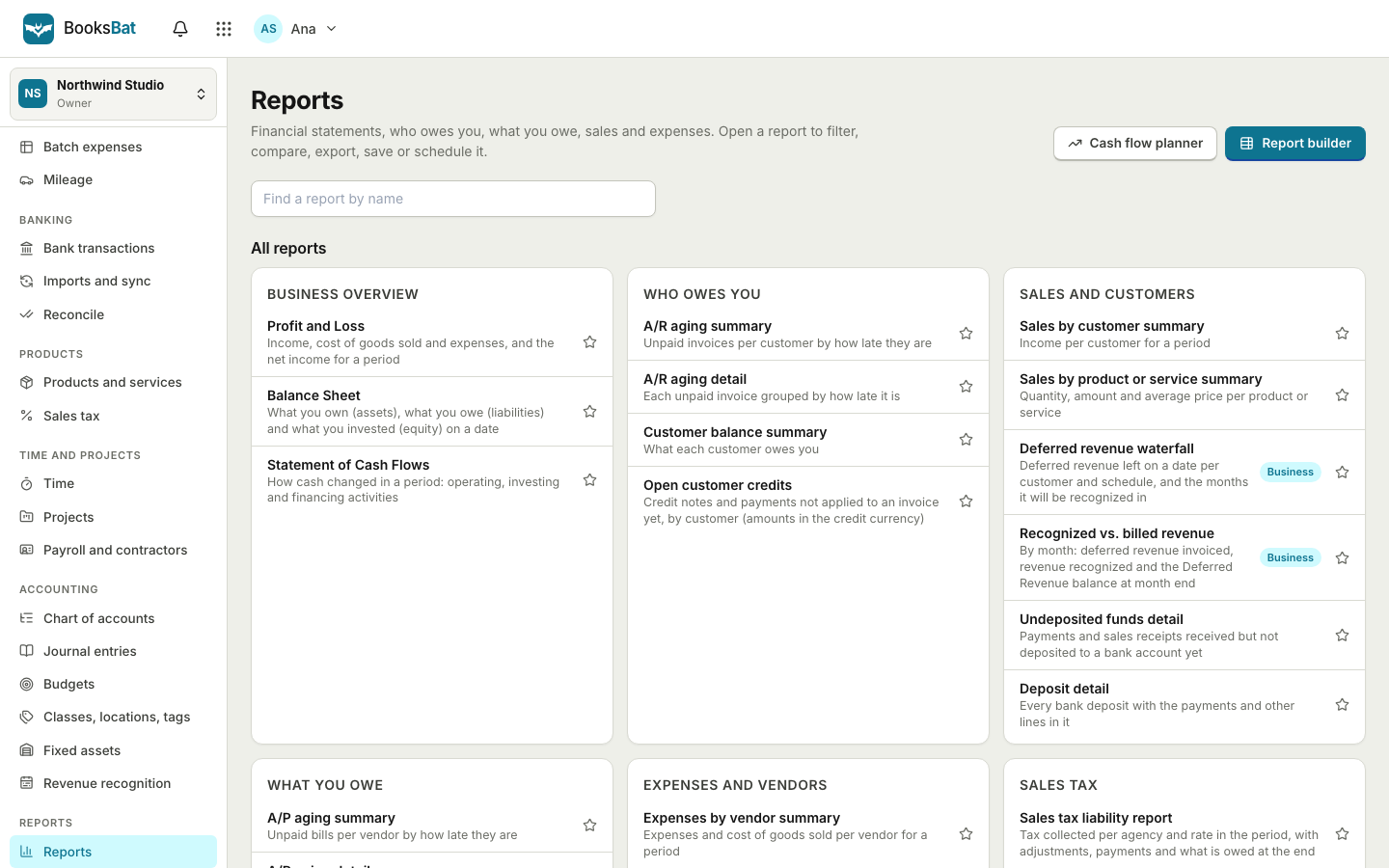 Dashboard and sales reportsSee what is outstanding, overdue and paid at a glance, with AR aging, sales by customer and tax reports built from your invoices.Bank reconciliationImport bank statements as CSV, OFX, QFX or QBO, categorize or match each line with bank rules, then reconcile to the statement.Sales taxSet up tax rates and agencies, charge combined or compound rates, see what you owe each period and record your tax payments.Time tracking and projectsTrack hours with a timer or timesheet, bill them on invoices and see the income, costs and profit of every project.Team and accountant accessInvite your team and your accountant with the right role, run several companies from one login and see every change in the audit log.
See how your business is really doing
Create a free account and your profit and loss is ready from your first invoice. No credit card, nothing to install.