Send quotes your clients can accept online
Price the job, send a professional quote and let your client accept it on a simple web page with a typed name and a checkbox, or an e signature. An accepted quote becomes an invoice with one click, or on its own.
- 5 free quotes a month
- Online acceptance included
- One click to invoice
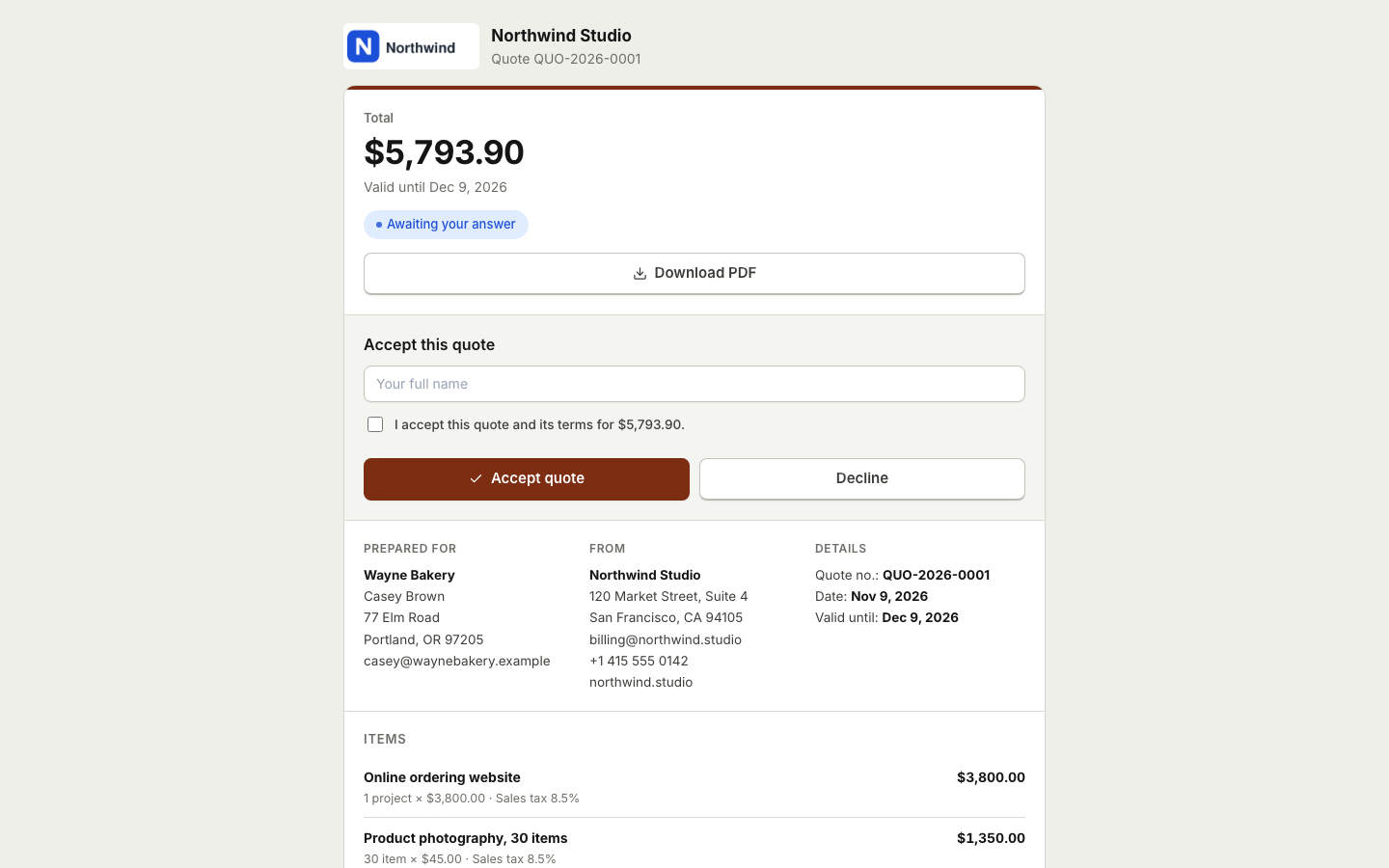
From yes to invoice without retyping anything
A quote is often the first real document a client sees from you. It should look professional, be easy to understand and be easy to say yes to. Too often, though, it is a PDF that gets printed, signed, scanned and emailed back, or an email thread where nobody is quite sure which version was agreed.
BooksBat quotes work like invoices. You add the same line items, taxes and discounts, choose the same professional design and send it by email with the PDF attached and a link to a public page. On that page your client can accept the quote with a typed name and a checkbox, or with an e signature if you ask for one. They can also decline and tell you why. Once accepted, the quote turns into an invoice with every line already filled in.
Why quote with BooksBat
Accepted online
Clients accept with a typed name and a checkbox, or an optional e signature, from any phone or computer.
Quote to invoice in one click
Turn an accepted quote into an invoice instantly, or let BooksBat do it automatically the moment the client accepts.
Clear answers
If a client declines, they give a reason, so you know whether to adjust the price or move on.
See what happened
Know when a quote was sent, viewed, accepted or declined, with a full timeline of events.
Matches your brand
Quotes use the same 8 designs as invoices, with your logo and brand color, so everything you send looks consistent.
How quotes work
- 1
Build the quote
Pick a client, add line items from your catalog, set taxes and discounts and choose how long the quote is valid.
- 2
Send it
Email the quote with the PDF attached and a link to its public page. Your client reviews it on any device.
- 3
Get a yes and invoice
Your client accepts online. Convert the quote to an invoice with one click, or let it convert automatically.
What is included
- Same line items as invoices
- Quantity, unit, unit price, per line discount as a percentage or amount, several tax rates per line and compound tax.
- Invoice discount and shipping
- Add a discount on the total and a shipping charge, with exact money math in any currency.
- Typed name acceptance
- Your client types their name and ticks a checkbox to accept. Simple, quick and recorded in the timeline.
- Optional e signature
- Ask for an e signature on the quote when you want the acceptance to carry a drawn signature.
- Decline with a reason
- Clients can decline and leave a short reason, which you see on the quote and in its timeline.
- Automatic conversion
- Choose to convert accepted quotes to invoices yourself with one click, or automatically on acceptance.
- Own numbering
- Quotes get their own number format, separate from invoices, and numbers never repeat.
- PDF and Word downloads
- Download any quote as a PDF or a Word .docx file.
Quote, estimate or invoice?
People use the words in different ways, but a simple rule works for most businesses. An estimate is your best guess of the cost, and the final bill may be different. A quote is a fixed price for a defined job, usually valid for a set time. An invoice is the request for payment after the work is agreed or done.
In BooksBat you can title the document as a quote or an estimate to match how you work. Either way, the client accepts it online and it becomes an invoice when you are ready to bill. A quote does not touch your books. Only when it becomes an invoice does BooksBat record the sale in accounts receivable and income, so your profit and loss never counts work that has not been billed. For a longer explanation, read our guide on the difference between a quote, an estimate and an invoice.
Good fits for online quotes
- Contractors and trades pricing a renovation, a repair or a construction estimate. See invoicing for contractors.
- Photographers sending package prices for a wedding, event or shoot. See invoicing for photographers.
- Agencies and consultants proposing a project fee before work starts.
- Cleaning businesses quoting a regular clean or a one off deep clean.
- Caterers quoting a menu for an event, ready to turn into the final invoice.
Start from an industry template in the template library, such as a construction estimate, a photography package or a catering quote.
From accepted quote to a profitable job
Winning the job is only the start. On the Business plan you can turn an accepted quote into a project, track the hours and expenses that go into it, and see project profitability as the work goes on. Billable time and expenses can be added to the final invoice, so nothing you spent on the client is forgotten.
On Pro, purchase orders let you order the materials a quote needs from your vendors, and the bills that follow post to your books alongside the invoice.
Frequently asked questions
How does a client accept my quote?
They open the link in your email, review the quote on a mobile friendly page, type their name and tick a checkbox. If you ask for one, they can add an e signature too. The acceptance is recorded in the quote's timeline.
Can a client decline a quote?
Yes. They can decline and give a reason. You see the reason on the quote so you can follow up or revise it.
How do I turn a quote into an invoice?
Open the accepted quote and click convert to invoice. All the line items, taxes and discounts are copied. You can also choose to convert accepted quotes automatically.
What is the difference between a quote and an estimate?
An estimate is an approximate price that may change. A quote is usually a fixed price for a defined job, valid for a set time. BooksBat handles both the same way.
How many quotes can I send for free?
The free plan includes 5 quotes a month, along with 5 invoices and 5 customers. Pro is $4 a month for unlimited quotes and invoices, and Business, at $12 a month, adds projects and time tracking for bigger jobs.
Does my client need an account to accept?
No. Clients never need an account. They use the private link in your email.
Related features
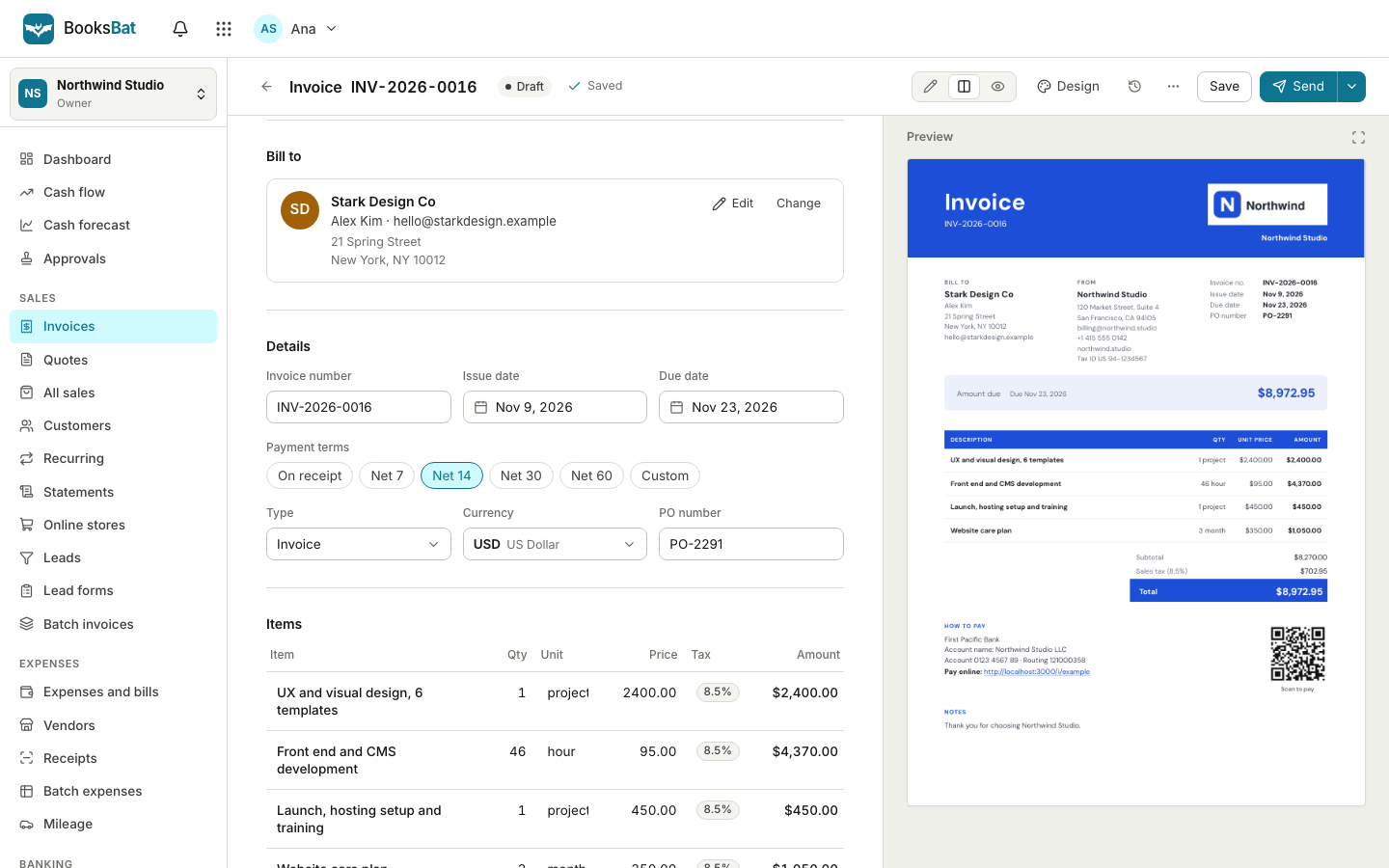 Online invoicingCreate professional invoices in minutes, email them with the PDF attached and let clients view and pay on a mobile friendly page.
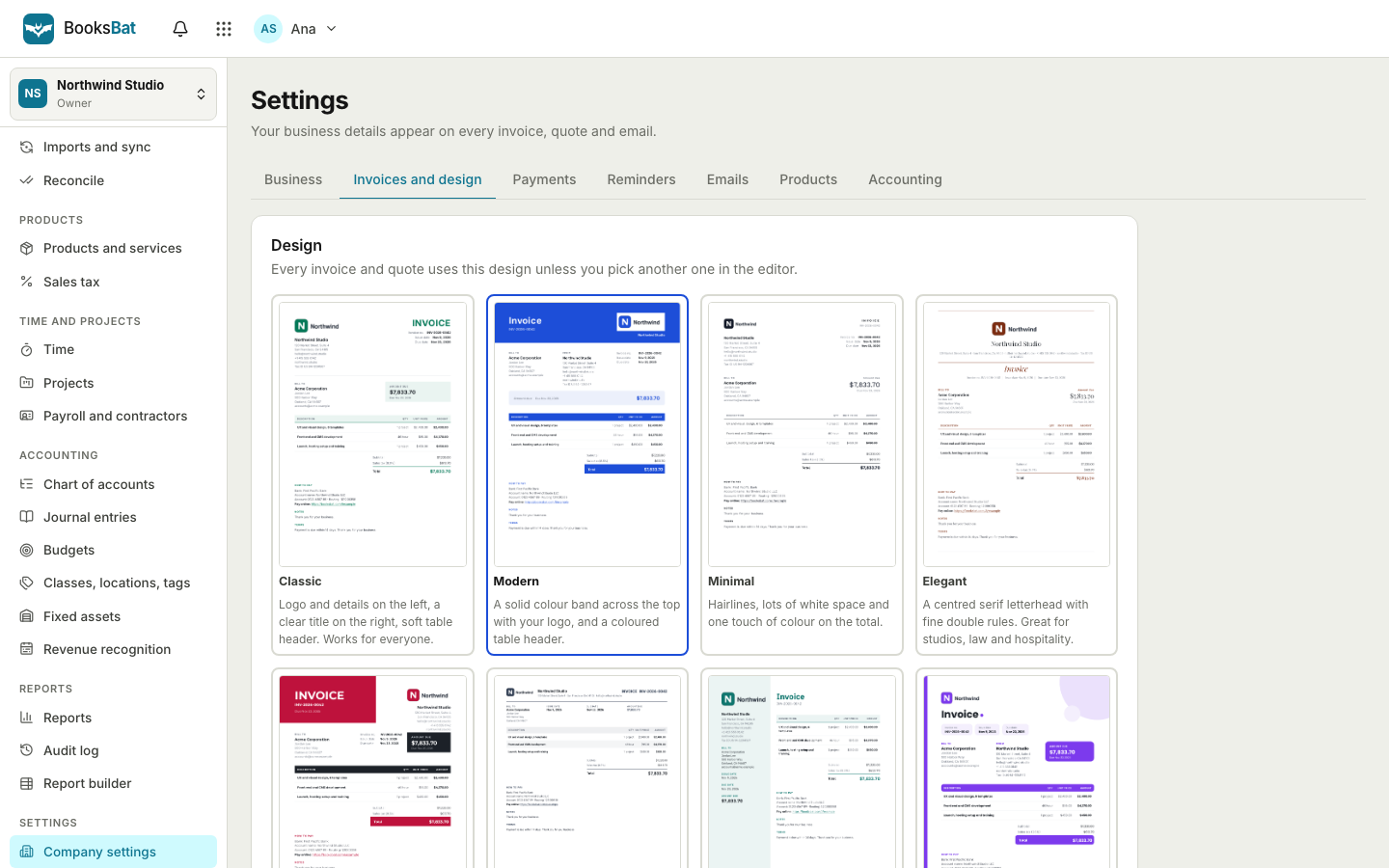 Invoice designs and templates8 professional invoice designs with your logo and brand color, plus a template library by industry. Download as PDF or Word.
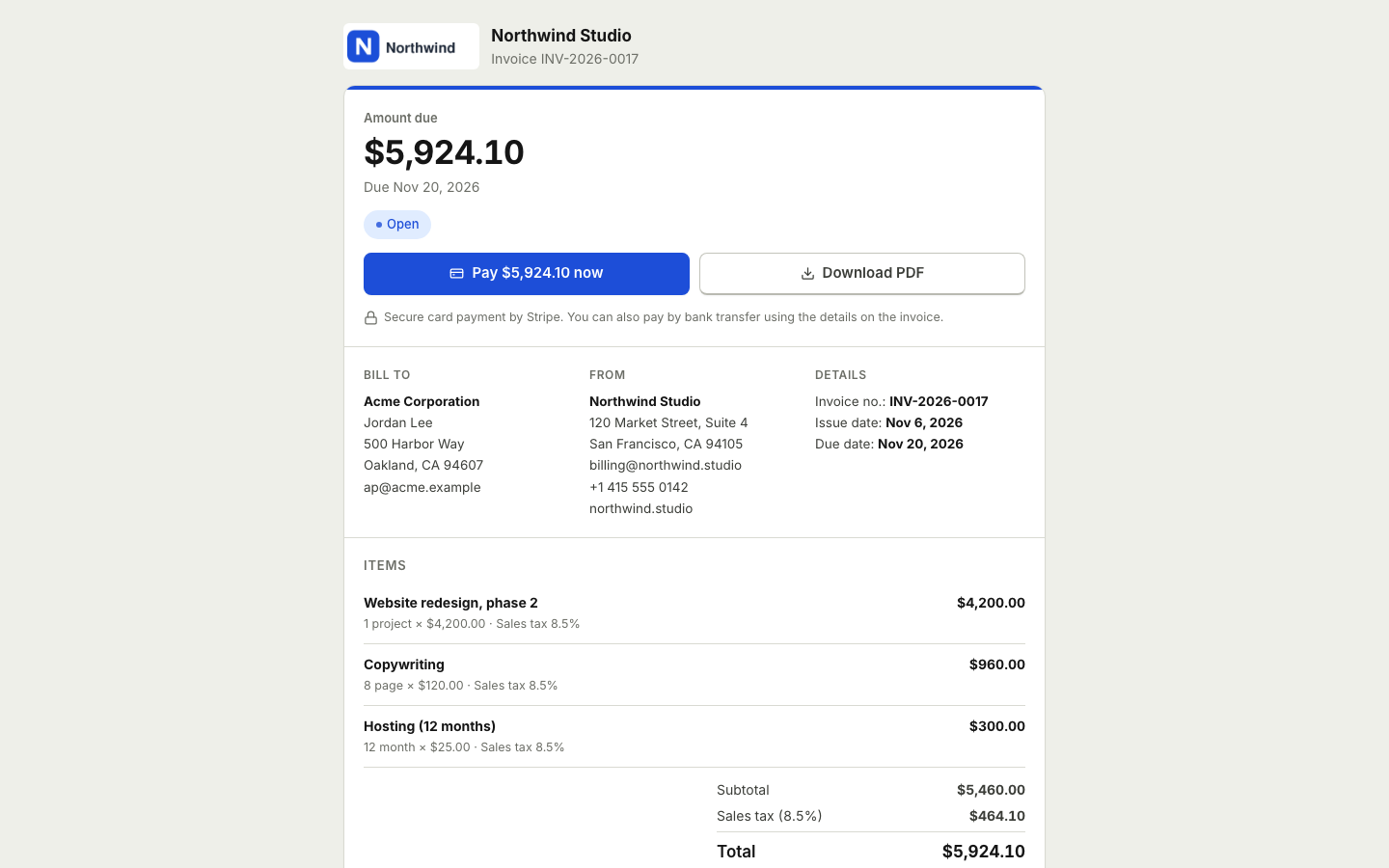 Online paymentsConnect your own Stripe, PayPal, Square, Razorpay, Mollie, GoCardless or Lemon Squeezy account. Clients pay online and the payment posts to your books.
 Time tracking and projectsTrack hours with a timer or timesheet, bill them on invoices and see the income, costs and profit of every project.Invoicing for contractorsSend estimates clients accept online, take deposits, and invoice the balance when the job is done.Invoicing for photographersQuote shoots and packages, take booking deposits by card and invoice the balance after the shoot.
Send a quote your client can accept today
Create a free account, add your business details and send your first quote in minutes. No credit card needed.